Hyper-Realistic Overhead Cityscape Prompt – Cinematic 9:16 AI Shot
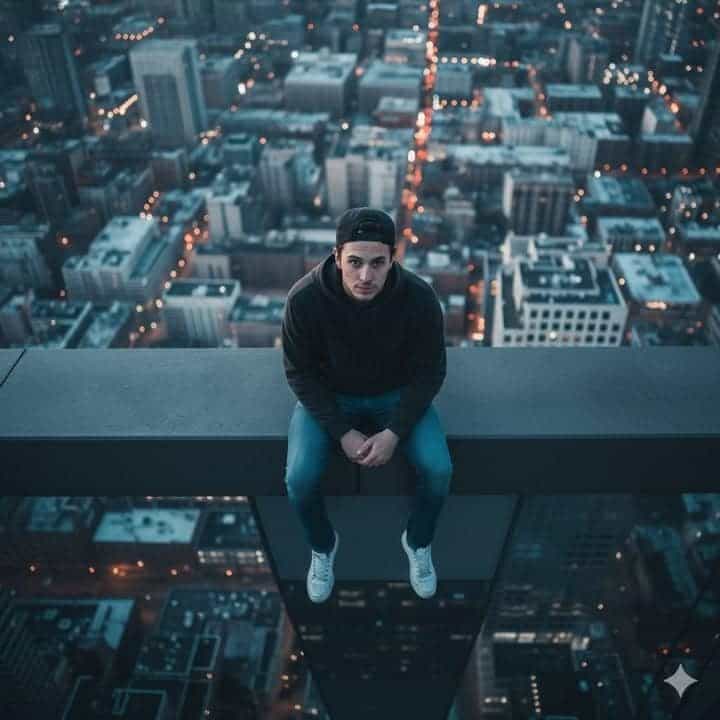
Create ultra-realistic AI renders with this prompt, featuring a man wearing a backward cap sitting on the edge of a skyscraper during blue hour. The overhead 9:16 shot captures dangling legs and a glance over the shoulder, with the city skyline softly blurred below. Designed for cinematic results, the prompt includes natural lighting, cinematic color grading, strong bokeh, and shallow depth of field. Render in 8K resolution for ultra-detailed, photorealistic visuals perfect for digital art, storytelling, and cinematic compositions.
Generated Images
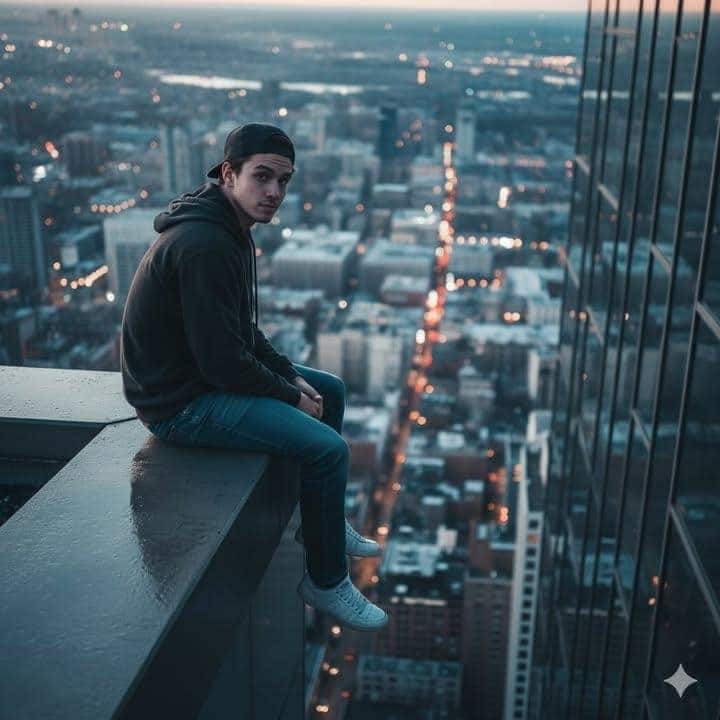
The Prompt
Hyper-realistic 9:16 overhead shot of me with exact same facial and physical features from the uploaded image wearing Cap backwords sitting on a skyscraper edge at blue hour, dangling legs. Looking back over shoulder with city skyline softly blurred below. Natural lighting, cinematic color grading, strong bokeh, shallow depth of field, 8K ultra-detailed cinematic shot. do not alter my face . aspect ratio 9:16
How to Use
Copy the prompt as-is and adjust any elements like clothing, pose, or time of day if needed. Paste into MidJourney, DALL·E, or Stable Diffusion with 9:16 aspect ratio settings for vertical cinematic framing. Ensure high-resolution output (8K if possible) and keep the cinematic color grading, natural lighting, and bokeh specifications intact to maintain the photorealistic quality.
Prompt Variations
Hyper-realistic 9:16 overhead shot of me with exact same facial and physical features from the uploaded image wearing Cap backwards sitting on a skyscraper edge at golden hour, dangling legs. Looking back over shoulder with city skyline softly blurred below. Warm natural lighting, cinematic color grading, strong bokeh, shallow depth of field, 8K ultra-detailed cinematic shot. do not alter my face. aspect ratio 9:16
Hyper-realistic 9:16 overhead shot of me with exact same facial and physical features from the uploaded image wearing Cap backwards sitting on a skyscraper edge at midnight, dangling legs. Looking back over shoulder with the city skyline below a brilliant, sharp grid of lights, softly blurred. Dark ambient lighting, cinematic color grading with deep blues and bright oranges, strong bokeh, shallow depth of field, 8K ultra-detailed cinematic shot. do not alter my face. aspect ratio 9:16
Hyper-realistic 9:16 overhead shot of me with exact same facial and physical features from the uploaded image wearing Cap backwards sitting on a skyscraper edge amidst a dramatic stormy cloudscape, dangling legs. Looking back over shoulder with the city skyline barely visible through the clouds below. Moody natural lighting, cinematic color grading with cool desaturated tones, strong bokeh, shallow depth of field, 8K ultra-detailed cinematic shot. do not alter my face. aspect ratio 9:16
Hyper-realistic 9:16 overhead shot of me with exact same facial and physical features from the uploaded image wearing Cap backwards sitting on a skyscraper edge at blue hour, dangling legs, clothes and cap visibly blown by strong wind. Looking back over shoulder with city skyline softly blurred below. Natural lighting, cinematic color grading, strong bokeh, shallow depth of field, 8K ultra-detailed cinematic shot. do not alter my face. aspect ratio 9:16
Hyper-realistic 9:16 overhead shot of me with exact same facial and physical features from the uploaded image wearing Cap backwards sitting on a skyscraper edge at blue hour, dangling legs. Looking back over shoulder with city skyline below heavily blurred by a tilt-shift effect, making it look miniature. Natural lighting, cinematic color grading, extremely strong bokeh, shallow depth of field, 8K ultra-detailed cinematic shot. do not alter my face. aspect ratio 9:16
Hyper-realistic 9:16 overhead shot of me with exact same facial and physical features from the uploaded image wearing Cap backwards sitting on a snow-dusted skyscraper edge during a light snowfall at blue hour, dangling legs. Looking back over shoulder with the snowy city skyline softly blurred below. Soft, diffused natural lighting, cinematic color grading with cool tones, strong bokeh, shallow depth of field, 8K ultra-detailed cinematic shot. do not alter my face. aspect ratio 9:16
Hyper-realistic 9:16 overhead shot of me with exact same facial and physical features from the uploaded image wearing Cap backwards sitting on a skyscraper edge at blue hour, dangling legs, with my reflection visible in the dark glass windows of the building behind. Looking back over shoulder with city skyline softly blurred below. Natural lighting, cinematic color grading, strong bokeh, shallow depth of field, 8K ultra-detailed cinematic shot. do not alter my face. aspect ratio 9:16
FAQ
- Can I change the person’s clothing or accessories?Yes — you can swap hats, jackets, or footwear in the prompt to customize the subject’s style without affecting the cinematic composition.
- Will this AI render work in all aspect ratios?It’s optimized for 9:16 vertical shots. Using other ratios may crop or alter the perspective, reducing the dramatic overhead effect.
Related Prompts